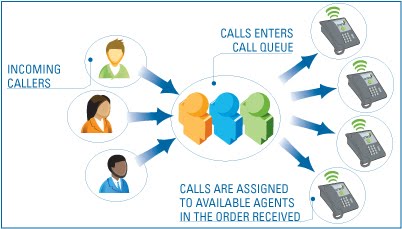
This week task was based on R&D. The topic given to me was Call Queuing. Call Queuing is a method of handling calls until they can be answered by an agent. Call Queuing is a sophisticated queuing system that allows you to accept more calls into your telephone system than you have extensions or employees capable of answering them.
A Call Queuing system handles incoming callers and prevents an engaged tone when the intended recipient, or group of recipients, are already on the phone. For example, if a member of the Sales Team is on the Phone, or even the entire Sales Team, a caller will hear an engaged tone unless Call Queuing is in place. The caller can be held in a queue and played music, or pre-recorded announcements, or given the option to leave a message. Call queuing significantly reduces the likelihood of missed calls and inquiries.
The queue works retaining call while finding an unoccupied agent to answer the call. Usually, a call queue works as below:
• Calls are queued.
• Agents answer the queue (logged in agents).
• A queuing strategy to distribute the calls is used.
• Music on hold is played while the caller waits.
• Announcements can be made to callers, warning about waiting time.
The next task was Automatic Call Distribution (ACD). An ACD is a system that automatically distributes phone calls to a specific group of agent work stations.
A department generally asks for one to be set up when it wants incoming calls to go to a single or main number and be distributed among a number of staff because the volume is too large to be handled effectively by one person. This single or main number is the one you will see published in the phone book. It is not assigned to a particular telephone. When someone calls this single or main number, the ACD routes the call to one of a group of working telephone extensions that have been assigned to the ACD group. During busy times when an agent is not immediately available, an ACD can queue calls, provide a recorded announcement, forward the call to someone designated to handle call overflow, offer a voice mail option, or give the caller a busy signal. A department determines what options a caller will be offered when the ACD is initially set up.
An ACD is really one component of an automated call processing system. It works in conjunction with the Phone Mail system to route incoming calls to staff whose job it is to answer the calls. If you have ever called a Medical Center Clinic, you probably heard, "If you are calling for an appointment, press 1, if you are calling for a prescription refill, press 2, etc." These options are provided by the Phone Mail system. When you press 1 for an appointment, the call is forwarded to an ACD. When you press 2, it is forwarded to a voice mailbox, etc.

The number of people in an ACD group is determined by the department when the ACD is set up. At some future time, a department may decide that there are too many or too few people in the group and adjust the number. An ACD forwards incoming calls to the staff member who has been waiting (idle) the longest. When all the extensions are busy, the ACD handles the call according to instructions in a "routing table" specified by the department. For example, the department might decide that if all agents are busy, it wants the caller to hear a recorded message and placed in a queue ("All agents are busy. Calls are answered in the order they are received."), or it may decide that a caller should be given the option of being put in a queue or leaving a voice mail message. There's a lot more to routine tables than this, but now you have an idea of how they fit in.

Lastly, I did a little research in Avaya, Genesys and Cisco. This products also uses call queueing and acd. Genesys supports the integration of IP telephony services (phone-based services) with a broad range of customer contact channels, such as other phones, e-mail or chat. ACD is a very popular feature within Cisco Unified CME for locations that don’t have the luxury of either having a Cisco Unity Express, Unity or IPCC Auto Attendant. Its purpose is to provide basic call handling service for incoming calls to a CME.
Here are several steps needed to configure CME B-ACD:
• Download TCL Scripts and Audio Prompts
• Set up incoming Dial Peers for AA Pilot Numbers
• Set up Ephone Hunt Groups
• Set up Call-Queue and AA service
Whereas, Integrating SpeechAttendant in an Avaya ACD environment involves the following steps:
Step 1: Creating a hunt group
Step 2: Programming agents
Step 3: Programming stations
Step 4: Programming a call vector
Step 5: Programming a vector directory number
Step 6: Configuring the settings related to automatic call distribution




 Audio Conferencing


.jpg)